
Howto : AJAX multiple file upload in Laravel (3)
In this short blog post I will share with you how I made queued multiple file upload possible with Laravel and a nice jQuery plugin called Dropzone.js.
I needed to give the user the ability to upload multiple images at once and instantly see visual feedback on the upload progress and/or errors that come up during the upload.
Dropzone.js comes with nice CSS and Javascript that make it a breeze to work with HTML 5 file upload API. It provides you with a file input container that users can drag and drop files unto or just click the container to select multiple files from the file system.
From the plugin docs: Dropzone.js works in :
- Chrome 7+
- Firefox 4+
- IE 10+
- Opera 12+ (Currently disabled for MacOS because their API is buggy)
- Safari 5+
For all the other browsers, dropzone provides an oldschool file input fallback.
To implement this awesome plugin here is what you need to do :
1) Download Dropzone.js Javascript and CSS and reference to them from your view (or layout):
{{ HTML::style('css/basic.css');}}{{ HTML::script('js/vendor/dropzone.js') }}2) In your view have a form element with class dropzone, action being the path to your upload route or controller and some id:
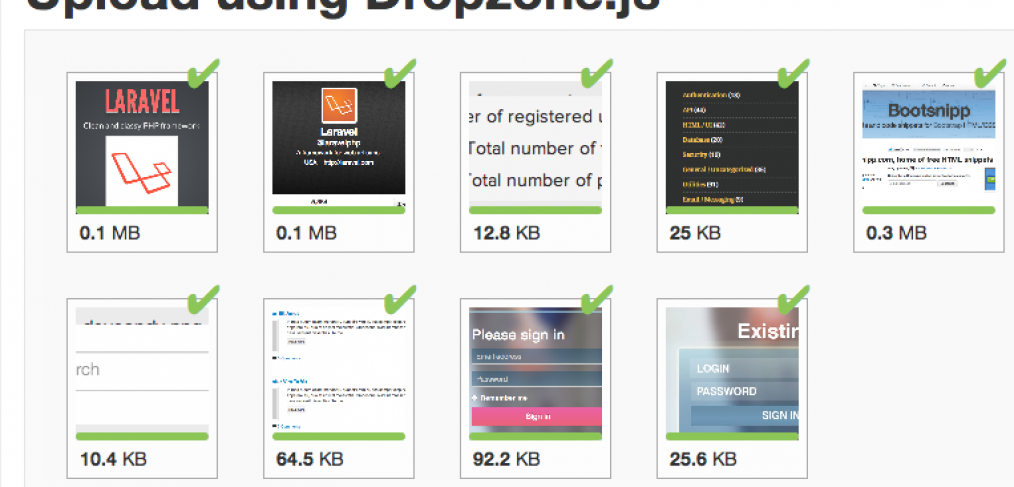
Upload using Dropzone.js
<form action="{{ url('user/upload')}}" class="dropzone" id="my-awesome-dropzone"></form>At this point if you go to the view where you implemented the dropzone plugin you should see it working. But it should give you errors when you try to upload files because the action where it tries to upload doesn’t exist yet. Now we need to hook up the form to a route or controller.
I have a controller called “user”, and the action that I need to build should do the following things:
- Validate my file upload to be an image (if I want only images) and below certain size limit in kilobytes.
- If the validation passes, upload the file and rename it to a random string to avoid collisions.
- If validation does not pass return the first error to the user and return status code 400.
- Upon file upload success make a JSON response with code 200 (because 200 is commonly used as a success response)
- Otherwise throw an error letting the user know that there was a server error.
Now that I have my algorithm figured out, I build the controller action :
public function post_upload(){

		$input = Input::all();
		$rules = array(
		    'file' => 'image|max:3000',
		);

		$validation = Validator::make($input, $rules);

		if ($validation->fails())
		{
			return Response::make($validation->errors->first(), 400);
		}

		$file = Input::file('file');

        $extension = File::extension($file['name']);
        $directory = path('public').'uploads/'.sha1(time());
        $filename = sha1(time().time()).".{$extension}";

        $upload_success = Input::upload('file', $directory, $filename);

        if( $upload_success ) {
        	return Response::json('success', 200);
        } else {
        	return Response::json('error', 400);
        }
	}
Side note, make sure you create a folder called “uploads” in the public folder because other files and folders will be created there.
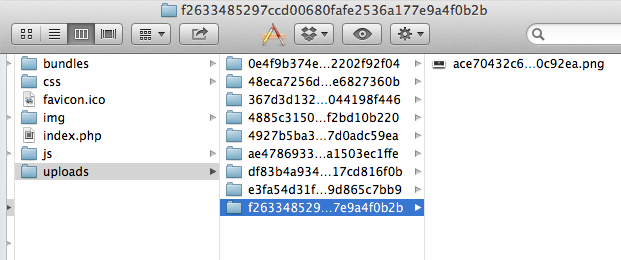
Now if you have your routes set up as mine (a user controller must be registered in the routes) and this action implemented you should see that the files are uploaded successfully and if you navigate to your public/uploads folder you should see something like this:
That’s it!
If you need the files to be resized/cropped in PHP before saving, make sure you check out some packages on Packagist, specifically :
http://intervention.olivervogel.net/
Let me know if you have any questions/problems with this.


Thanks for all the Laravel Tutorials. Keep them coming!
Hi,
Thanks for this tutorial but your form’s HTML is not displayed correctly. It should be like below;
And if you enabled CSRF protection, which you must, then you have to insert token in your form;
{{ Form::token() }}
WordPress messed my previous comment. The HTML form should be;
form id=”my-awesome-dropzone” action=”{{ url(‘user/upload’) }}” class=”dropzone”
Can you please share a tutorial where we can show the save image with the post, Like you made the blog tutorial if some one want to publish the image with post how we can do that ? I am waiting for your positive response.
Thanks
Regards,
on ln 18 you have $directory = path(‘public’).’uploads/’.sha1(time());
Does anyone know in Laravel4, how to access path()? It does not appear to be present.
just try to do ‘public/uploads’ instead of using “path(public).’uploads'”.
If I dont want to create new folder just saving all files in one folder how I can do that?
Just replace
path(‘public’).’uploads/’.sha1(time());
with
path(‘public’).’uploads/yourfolder’);
=)
@matenyo I wrote a tutorial on using Dropzone.js and #laravel PHP framework: http://t.co/4nWpYrB2lm pls add to github wiki!
RT @msurguy: @matenyo I wrote a tutorial on using Dropzone.js and #laravel PHP framework: http://t.co/4nWpYrB2lm pls add to github wiki!
Hi, thank you for your tutorial, works perfectly.
Sometimes i need to upload only one file and prevent multiple choice. I can’t find how i can do that with dropzone.
Is it possible?
Thank you one file
I have searched its documentation and I don’t think you can do that with dropzone.
As a better alternative for AJAX style uploads I recommend this – http://malsup.com/jquery/form/#file-upload
Hi thanks for this turorial. One thing, iv got problems when image width dimension is above 2031 px. I wont upload and give no error message on the dropzone. The green check mark is shown but wont upload. Thanks, Hope you can help me on this.
That probably is the PHP upload limit issue. Try increasing the max size of file uploads
Hi I’m new to Laravel and your code helped me a lot. My problem after uploading files is to show or view the list of files uploaded. I hope you can help me. 🙂
Are you using Laravel 3 or 4 ?
I prefer to save information about the uploaded files into the database and then just showing the items from the database
How to add Remove per file and remove all files option …
Thanks in Advance
You would have to make that as a separate AJAX call to the server. Let’s say your user is logged in, then from the page with file uploads you make a POST request to your application’s API or controller action with the ID of the file, and on the server side you have to make sure that this file indeed belongs to the user and then you can use Laravel’s file removal function to remove the file.
Does that solve your question?
no doubt good work.
Can you give a zipped example… not only files to configure.
one i can put on server and emediately see it working without making upload folder and the like.
it will be a 1000 times better than tutorial.
or please email me such zipped at webuzy at yahoo of com
I am sorry, I don’t have the complete example ready to be shared in full. The example that I had transformed into a full application : http://fldrp.me
{“error”:{“type”:”Symfony\Component\HttpKernel\Exception\NotFoundHttpException”,”message”:””,”file”:”C:\xampp-portable\htdocs\jamshop\bootstrap\compiled.php”,”line”:4921}}
What The Problem?
try running “composer dump-autoload”
and “php artisan optimize”
commands
Your links to Dropzone website are broken in this post…
Hey Marks Im confused with the route, always recibe a 500 internal Server Error
this is my route
Route::get(‘/’, function()
{
return View::make(‘home.index’);
});
Route::post(‘user/upload’, ‘user@upload’);
…..
and my controller
‘image|max:3000’,
…..
what is wrong in the code ?
can u help me?
Which version of Laravel are you using ?
If using Laravel 4 please follow the link I just posted at the top of this post that says “Update …” because in Laravel 4 things are a bit different
Hello there, I want to ask if possible to show image that already uploaded and saved in database to dropzone? I means when we refresh the page, the image that was saved in database is still show in the dropzone area.
#sory for bad english
ohh sorry I dont recibe a mail for you reply… ist both l3 and l4 … its the same error POST http://upload-l4/user/upload 500 (Internal Server Error)
I confused in the route part …
this is my route file
Route::get(‘/’, function()
{
return View::make(‘hello’);
});
Route::post(‘user/upload’, ‘HomeController@upload’);
Thanks used this as base for Zend 2 version.
Sorry, If anybody are implemented this dropzone.js and can help me?.
I need some changes but Im not professional with Javascript.
I need upload only ONE photo a time, and when the foto is right upload show button to aks to the cliente ‘Is this the photo?, and press OK then jumping automaticaly to my process page in php to recording the register in the database with Mysql.
Please help me.
Francisco (from Spain)
(excuse me my bad english)
Hello,
It,s good work. but if any user upload wrong file then there should be option for remove file. is it possible with this plugin?
if yes then how???? 😮
The new version of the plugin allows this, you have to use addRemoveLinks option to be true:
var myDropzone = new Dropzone("#screenshots-dropzone",{

        url: "{{url('admin/screenshots/upload')}}",

        addRemoveLinks: true,

        maxFiles : 4,

        acceptedFiles: 'image/*',

        maxFilesize: 5

      });
And then create a handler to send a POST request on item removal:
myDropzone.on("removedfile", function(file) {if(file.xhr){
var url = JSON.parse(file.xhr.response);
var imagepath = url.url;
$.post( "{{url('admin/screenshots/remove')}}",{ url : imagepath });
}
myDropzone.options.maxFiles++;
});
And of course add the backend routes for the actual process to remove the files…
In laravel 4 its public_path()
HI, I’m totally new to laravel! How should I have the route for this?
You would place it into a POST route that you define like this:
Route::post(‘upload’, function(){
//place code here
})
Hi Maks, I want to integrate your excellent code snippet into my app. The problem I am having is that I rename each file to a random file name and want to store some meta information about each file in the db. However, I have no idea how to detect in the dom, which image was clicked so I can configure its meta info in another form (because I’ve renamed it). Can u help me?
i have the same question… especially when i tried to use dropzonejs on iOS, all the photographs that we select will upload with the same name “image.jpg”, which caused the collisions and only the final image file will be uploaded into the uploads folder. adding the random content to the files while uploading resolved the issue. but it caused an other problem.. i.e. the delete links not working on the images as the images uploaded into the folder are of different names that are there in dropzone.
One thing I noticed was you had dropped just “dropzonejs.com” in your anchor’s href. This makes it see it as being relative to your website. It should be “http://dropzonejs.com” to reference it properly. Thanks for the tutorial anyway
Hello, I have a form for ading a new task, and that task has images…I want to integrate field (dropzone) inside current form (add task), so when I click “Save task”, images start to load, after loading…becouse I want to save image info to db for accessing later.
Ok, what exactly is your question?
How to store the files to the database ? ( e.g the path of the image and an ID )
You would do that by storing the $directory and the $filename in the DB. For example I would have a table called “items” and have columns “path” and “filename” that I’d insert those values into. Hope that helps!
Thanks for your effort
I’ve got this exception: TokenMismatchException
That means you have a CSRF filter on that route and you need to also pass a CSRF token with the file payload.
How to do that? 🙂 My email is luka . cavic @ gmail . com – Can I contact you for help with this? 🙂
Thanks a lot! You rock!
In laravel 4.2 you can use the form helper:
{{Form::open(array(‘url’ => ‘users/upload’, ‘method’ => ‘POST’, ‘files’ => ‘true’, ‘data-ajax’ => ‘ture’, ‘class’ => ‘dropzone’))}}
{{ Form::close() }}
I’m always get error with this : Class ‘AppHttpControllersFile’ not found
Please help
Import it in your document
use File;
For laravel 5 ?
noice. but how do i delete the file afterwards? many thx!
Hi!
I have followed the steps and this doesn’t work, my file object on server y totally empty and dunno why.
These are my lines of code:
Route:
Route::post(‘{zip}/{street}/photos’,’FlyersController@addPhoto’);
Blade template with Dropzone:
zip }}/{{ $flyer->street }}/photos” class=”dropzone”>
{{ csrf_field() }}
My controller
public function addPhoto(Request $request,$zip,$street)
{
$input = Input::all();
return Response::make($input, 200);
}
The problem is that the file object is empty, the response from the server is this:
{“_token”:”pjWaWbuKzCXE3R8UrOnc9pepaHIKVIajzR1MJYOl”,”file”:{}}
So file is created but is totally empty!!
Any ideas? Thanks a lot!
the post_upload doesn’t work. it returns a bunch of html codes.
Cannot use object of type IlluminateHttpUploadedFile as array
how to fix it ?
im getting 401 (Unauthorized) error.
im also add csrf field . How can i resolve this ? Pleas help
Thanks for the tutorial
Could you please create one on laravel 5 whereby each of the images can be uploaded on different columns in the database table
Hello! I think I have a tutorial for Laravel 4 that should work on L5, it is in my book : https://maxoffsky.com/frontend/